How to Download Windows 10 on Mac Youtube
When it comes to online video content, YouTube is the largest site having videos from virtually all genres. No matter whether you lot are searching for the latest sensational music video, a tutorial, a regional movie, a funny clip, or a high definition wildlife video, YouTube has all. Watching YouTube videos online is easy if you have a strong internet connection, but what if you want to savour them offline on your Mac? There are a number of ways through which yous can download videos on your organization, and watch them whenever and wherever yous want without bothering well-nigh a information connection. The post-obit part of the commodity discusses different ways to download YouTube videos Mac.
- Part 1. Best YouTube Downloader Mac to Download YouTube Videos
- Part 2. Costless Download YouTube Video on Mac Using Safari
- Office 3. Free YouTube Downloader Online for YouTube Video Download Mac
- Part 4. Save YouTube Video with VLC Player
Part one. Best YouTube Downloader Mac to Download YouTube Videos
There is a decent number of downloader tools available for the Mac arrangement with various functions and features. One such professional YouTube video downloader Mac is Wondershare UniConverter (originally Wondershare Video Converter Ultimate). Working as a complete video toolbox, the programme supports an array of functions similar video conversion, download, recording, DVD burning, transfer, etc.
 Wondershare UniConverter - Your Complete Video Toolbox
- Supports downloading videos from over 10,000 sites including YouTube, Dailymotion, Vimeo, and others
- Allows downloading 4K/HD videos in excellent quality
- Allows downloading YouTube playlist in One Go
- YouTube to MP3 conversion in a unmarried click
- Lossless quality video download at a super-fast speed
- Works on all popular Mac and Windows Os versions
- YouTube downloaded videos can be converted to over grand formats
 Security Verified, 5,942,222 people have downloaded it
How to Download YouTube Video on Mac Using Wondershare UniConverter
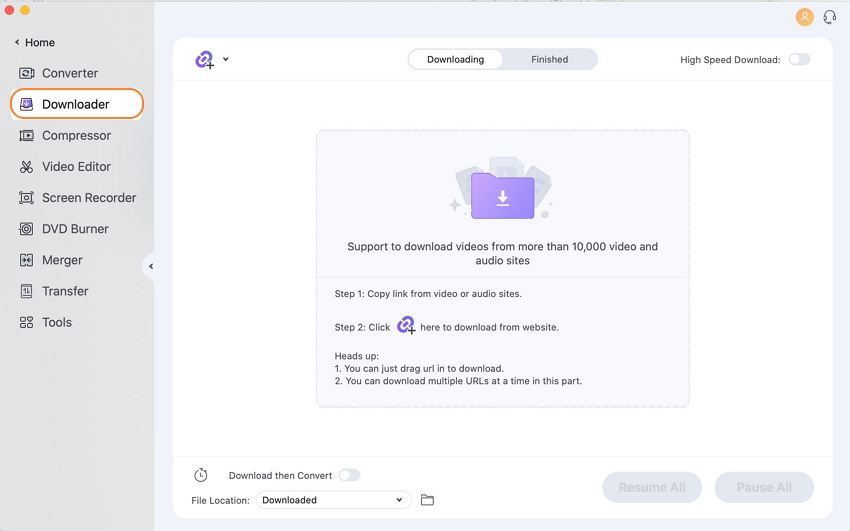
Step 1 Launch Wondershare YouTube downloader Mac
Download, install, and launch Wondershare UniConverter for Mac on your system.
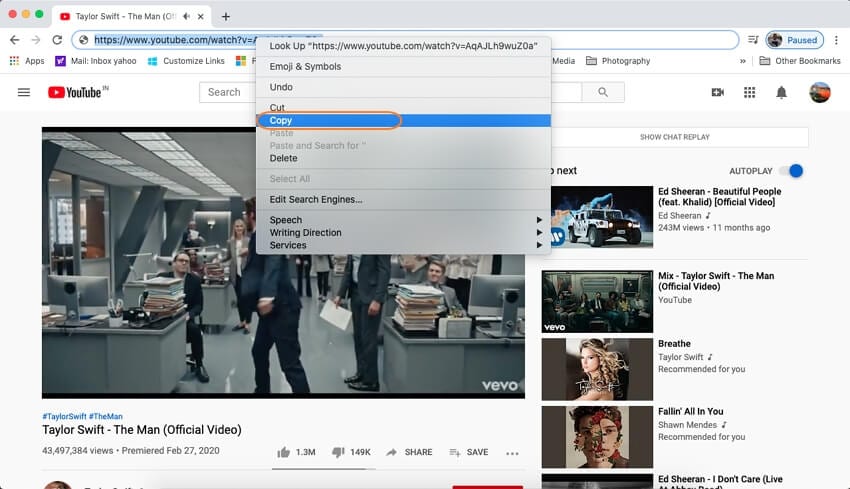
Step 2 Re-create YouTube link
Open the desired YouTube video that you want to download on your Mac browser and copy its link.
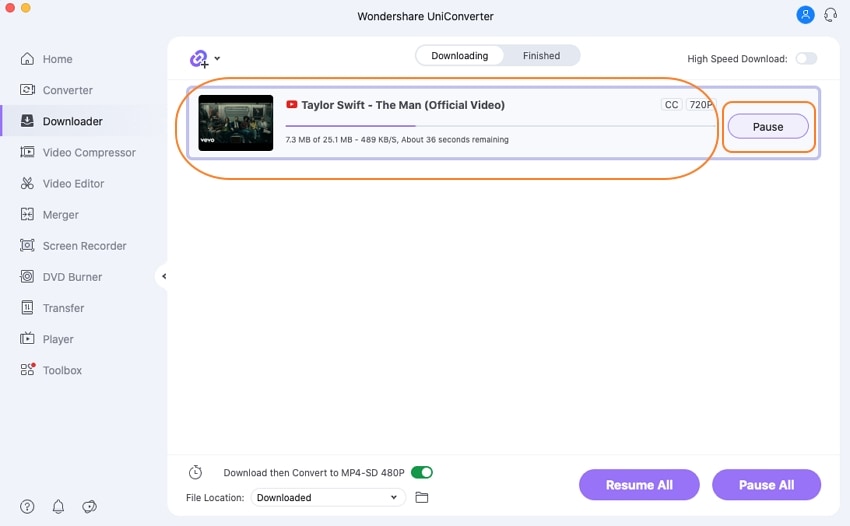
Stride three Paste YouTube link on the Wondershare interface to download video
Select the Downloader tab on the software interface, and click + Paste URL. The copied link will automatically paste and the video download procedure will showtime.
Step 4 Check the downloaded video
Once the download process completes, the video will appear under the Finished tab.
Role ii. Free Download YouTube Video on Mac Using Safari
Another method for downloading YouTube videos to Mac is past using the Safari browser. Though at that place are no specific commands for capturing the YouTube videos, the built-in tools of the browser can be used for the same. The method downloads the YouTube video equally a Flash file which can exist played using a third party program.
Steps to Download YouTube Video with Safari Browser
Step 1. Open the YouTube video that yous desire to download and play it
Step two. Press the Command-Pick-A to open up the Safari Activity window (Enable the develop menu start and for this check Preferences > Advanced > Prove Develop in the menu bar.)

Step 3. Next, check for the video resource in the window that will show the name of the video followed past YouTube give-and-take. If it does not appear, reload the page.
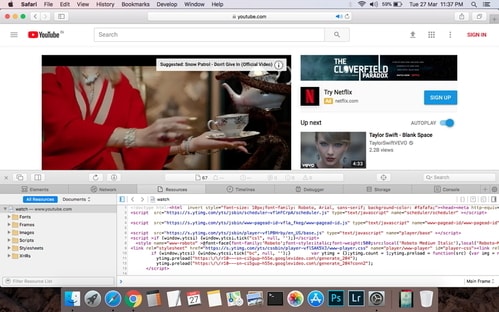
Step four. Once you lot found the resource link, double-click to open it.
Step 5. Focus on the location bar and then hit the pick-enter to start downloading the video. The YouTube video will download on your Mac system, equally Flv file.
Part 3. Free YouTube Downloader Online for YouTube Video Download Mac
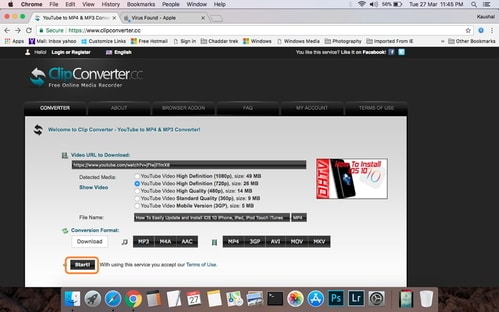
If you are looking for a free YouTube downloader online then ClipConverter will evidence to exist a skillful option. This online media recorder allows recording videos from YouTube, Vimeo, Facebook, and other popular sites. You can select the format and the quality of the recorded video. ClipConverter has a simple to understand interface which makes it like shooting fish in a barrel for all to download their desired videos for offline watching.
How to Download YouTube Video Using ClipConverter
Step 1. On the Mac browser, open the YouTube video that you lot want to download and copy its URL.
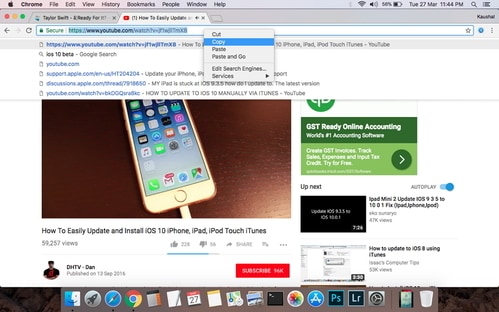
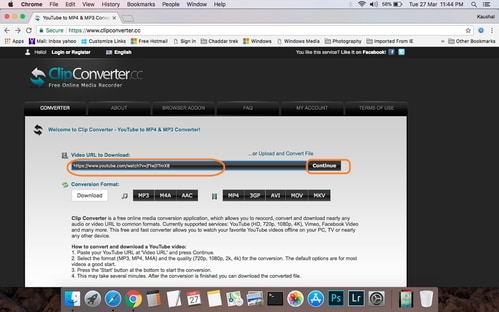
Step ii. Open up https://clipconverter.io/ on your Mac browser. Paste the copied video link to Video URL to Download tab and click Continue.
Step 3. The program will show the different video quality and resolution from which yous can select the desired pick. If needed, yous can besides select the format- MP3, MP4, M4A, and others in which you want the downloaded video.
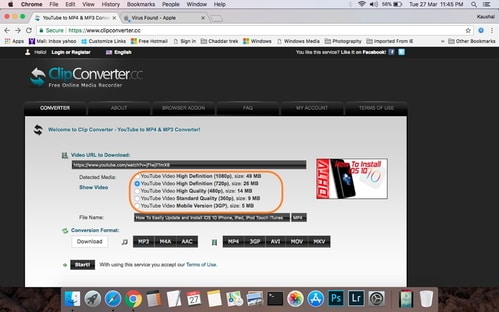
Step 4. Striking the Start button to proceed with the video download. Once the procedure is consummate, you can download the converted YouTube file from the programme interface.
Role 4. Save YouTube Video with VLC Player
VLC is a pop and free to apply open-source media platform that tin not but play your videos but also perform a host of other functions including YouTube video download. And so if you are in no mood to install any third-party software, or apply an online media recorder, VLC is at that place for you lot. Though the process is not as simple and straightforward as other methods, it will surely download your desired videos. Since VLC download the videos directly from the server of Google, the procedure is very fast.
Steps to Download YouTube Videos Using VLC Player
Step ane. Open the YouTube video that you want to download on your Mac browser and copy its link.
Step two. Open the VLC Media player on your Mac. Select File and then Open up Network choice.

Pace 3. Select the Network tab and paste the copied YouTube URL at the box. The video will start playing.
Step 4. Select Window and from the drib-down menu click Media Data. A new pop-up window showing video information will appear. At the given page, copy the link at the Location bar at the lesser, This URL shows the verbal YouTube video link from the Google Server. Copy the link.
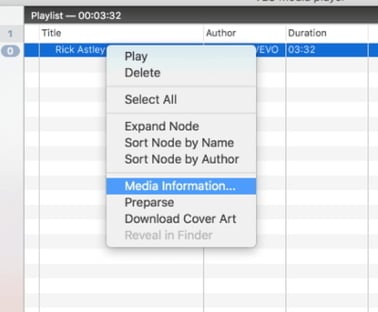
Step 5. Paste this new link at the address bar of your Mac browser.
Step 6. The video will start playing in our browser from where you need to right-click and select Salve As or Save Video As… option. And so y'all tin can quickly download and relieve the video on your Mac's hard drive.
The above listed are different types of YouTube downloader Mac. Y'all can select from the methods that best suit your requirements. Overall, considering the quality, speed, ease of use, and added functions, Wondershare UniConverter proves to be the best solution for downloading YouTube videos to Mac.
How to Download Windows 10 on Mac Youtube
Posted by: walstonhouther.blogspot.com